
I want to start with a confession: I almost didn’t write this review, because I couldn’t figure out how to get past the name.
A few weeks ago I mentioned POTACAT to a group of ham buddies on a Zoom call, and three or four of them threw their hands up immediately. “I don’t do POTA.” I spent the next several minutes trying to walk back the framing – no, it’s not just a POTA app anymore, it does SOTA, DX cluster spots, the Reverse Beacon Network, FT8 with a built-in decoder, remote operation from your phone, even a WSPR beacon mode – and I’m honestly not sure I persuaded anybody. The name is catchy, it’s memorable, and it undersells the product badly. If you’ve written POTACAT off because you’re not a park hunter, you’re judging a Swiss Army knife by its bottle opener.
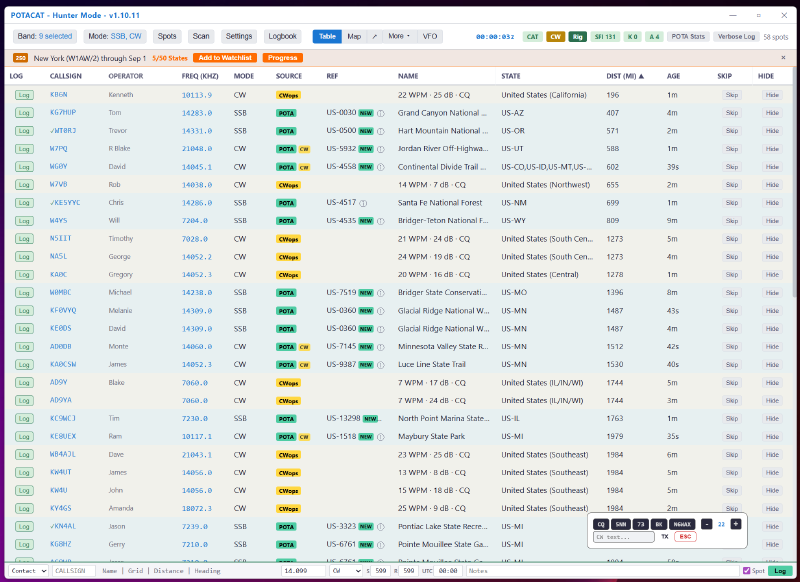
What it actually is: a free, open-source desktop app that aggregates real-time spots from basically every activity network hams care about – POTA, SOTA, DX Cluster, RBN, WSJT-X decodes, DX expeditions – into one filterable table and map, and tunes your radio to any of them with a single click via CAT control. From there it just keeps going: QSO logging with ADIF export, a full FT8/FT4 engine so you don’t need WSJT-X running separately, a CW keyer, solar propagation data, and ECHOCAT, its companion remote-operation feature that lets you run your station from a phone browser. That’s a review of its own – I’m not going to try to cover it all here, and neither should you try to learn it all before you install it. Grab the free download from potacat.com, hook up CAT control, and give yourself a couple of operating sessions. The feature set makes a lot more sense once you’re clicking around in it than it does on a features list.
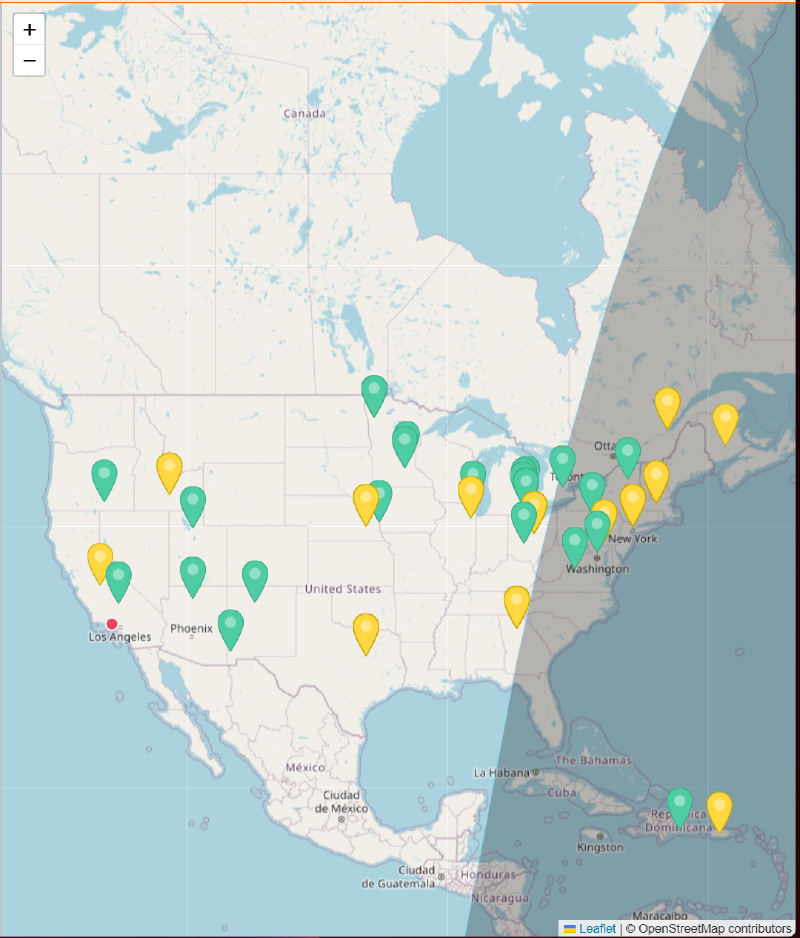
The table view is where I live most of the time, but the map view is worth a look too – every spot plotted geographically, color-coded by source, so you can see at a glance where the activity is without scanning a wall of callsigns.
The pace is the story. POTACAT is written by Casey Stanton, K3SBP – a ham himself, obviously, since nobody who wasn’t would keep shipping at this rate. For long stretches he’s been pushing updates practically daily, and not small ones. In the space of a few recent releases he’s shipped a complete JS8 operating panel with its own waterfall and heartbeat replies, fixed a Windows sample-rate bug that was silently killing FT8 decoding for some users, and tracked down a VFO-B display bug on Kenwood rigs that took a full session trace to run to ground. Read the changelog yourself at github.com/Waffleslop/POTACAT – it reads less like release notes and more like someone’s daily build log, and the pace alone tells you something about how much this guy uses his own software.
Here’s the part I find genuinely refreshing, though: he doesn’t just ship fast, he ships what his users actually asked for, and he tells you so. Scroll through the release notes and you’ll see bugs credited to the operators who found them – a PTT button that mysteriously vanished, chased down from a report by one specific caller; a Windows audio bug traced back to another. He’s running an active Discord where people post feature ideas constantly, and unlike a lot of developers, he actually responds. As a Buy Me a Coffee supporter myself, I can say I’ve passed along a handful of comments over there and never once been ignored.
I’ll give a tip of the hat here to Stu, G5STU, over at Station Master Pro too – a completely different developer, a completely different (paid) product, but the same rare trait: he’s in his own Discord, he answers people directly, and his users say so in reviews. It’s worth naming both of them, because it’s apparently possible to run a small ham radio software project this way. It’s just not common. After years of waiting on Ham Radio Deluxe to move at anything faster than a crawl, watching a developer this locked in on customer satisfaction and turnaround time is a genuinely nice change of pace.
The core app costs nothing, and I want to be clear about that – there’s no bait-and-switch here. But if you use the Buy Me a Coffee link on Casey’s site and become a supporter, you pick up a handful of extras: cloud-related conveniences, embeddable widgets for your QRZ page, a Discord supporter role, a supporter-only feature request channel, and – because ham radio never misses a chance for a pun – a two-paw emoji 🐾 next to your callsign in the app while you’re activating. None of it is required to use the software well, but if a developer is shipping at this pace for free, throwing him a few dollars a month feels like the least I can do.
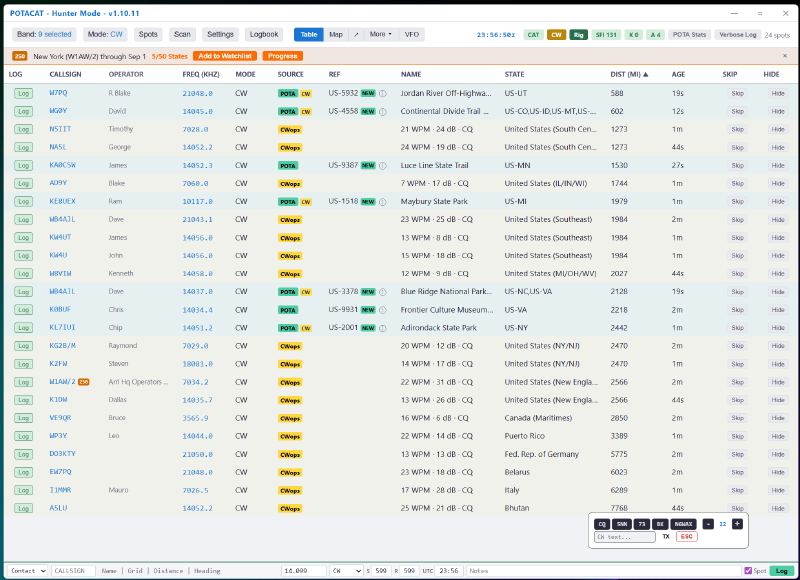
Now, the part I actually care about most: I started learning CW earlier this year, and POTACAT has become genuinely indispensable to my practice sessions. I use the filter bar at the top to narrow the spot table down to just the bands I’m working and just CW mode. What comes back is a clean, live list of CW operators on the air right now – and in many cases, POTACAT shows you the activator’s sending speed in WPM, pulled from Reverse Beacon Network skimmer data. For a new CW op, that’s huge. I can scan for the slower senders, dial one in, and answer their CQ already knowing their callsign cold – which takes an enormous amount of pressure off a beginner’s copying ability. I half-suspect that’s part of where the name actually comes from: you’re pouncing.
I’ll say this plainly: there is no other piece of software in this hobby that has brought me as much fun as POTACAT has. It is relentlessly user-focused, it does what it does extremely well, and I am having a blast with it every time I sit down at the radio. I recommend it to anyone in this hobby, full stop.
Is it perfect? No. The name will keep costing it first impressions with hams who hear “POTA” and check out before they’ve seen what else is under the hood, and between the free core app, the Discord supporter perks, and a separate mobile subscription tier, the monetization picture has gotten a little harder to explain in one sentence than it used to be. Neither of those is a reason to skip it. Install it, hook up CAT control, and give it a weekend. I think you’ll find, like I did, that the name is the worst thing about it.