
If you practice CW with a group on Zoom, you’ve been here. The canned QSO: name, QTH, rig, antenna, weather, 73. Then “tell us what you’re having for dinner.” Then “send us your favorite car ever.” And on and on it goes. None of these are bad exercises. The problem is that we’ve all done every one of them before, many, many times, and it shows.
Then comes the moment every group knows too well. The host unmutes and asks, “So… what should we practice?”
Silence. A dozen video squares, and not one idea among them.
After enough of those silences, I decided our sessions needed something new. So I built a fun tool for our Zoom practice: Morse Code Jeopardy, a free, browser-based game show for CW groups on Zoom. It’s now live on the CW Tools page.
How a round works#
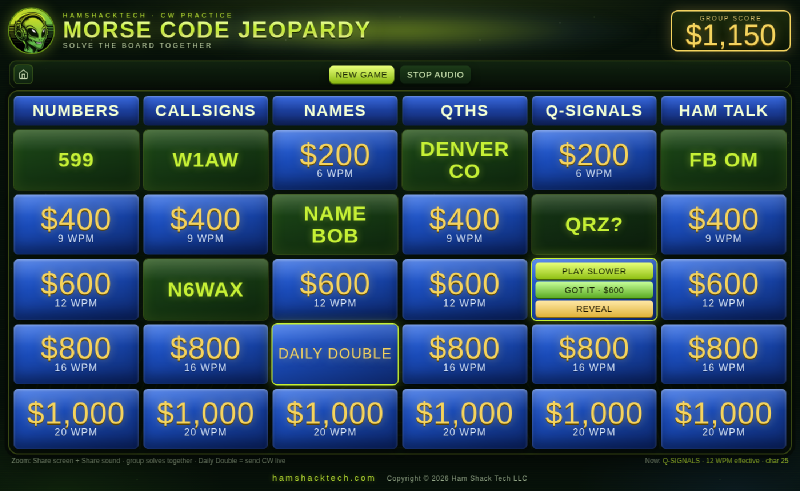
The board looks just like the TV show: six categories across the top, five tiles in each column from $200 to $1,000. The twist is that each row is a different speed. The $200 tiles play at 6 WPM, and they climb from there through 9, 12 and 16 WPM, all the way to 20 WPM for the $1,000 tiles.
- A player calls out a category and a dollar amount, just like on TV.
- The host clicks the tile. After a three-second “stand by” countdown, the hidden answer plays in Morse.
- If the group copies it, the host clicks Got it and the tile’s full value goes into the Group Score.
- If the group can’t copy it, the host clicks Play Slower. It replays at about 70% speed, and then 50% if needed. Each replay is still worth something: half the tile’s value on the second play and a quarter on the third.
- Still stumped? Reveal shows the answer, and clicking a revealed tile plays it again so everyone can hear what they missed.
The categories are Numbers, Callsigns, Names, QTHs, Q-Signals and Ham Talk. They’re full of the things you’ll actually hear on the air: RST reports, POTA references, grid squares, real-world callsign formats, and a few answers that are there just to get a laugh when the group finally copies them. (“QRP 1500 WATTS” comes to mind.) Yes, that’s my own call on the board in the screenshot. It’s in the Callsigns list, so you might get to copy me too.
The Daily Double: your turn on the key#
Every column hides one Daily Double. When a player finds one, the roles flip: that player has to think of an answer that fits the category and send it live on their own key while the rest of the group copies. The tile is scored like any other. It’s worth full value if the group gets it on the first send, and less if the sender has to repeat it.
This turned out to be my favorite part. Receiving is only half of CW, and a low-pressure moment of sending to friends is great practice for the half that happens when you’re the one on the key.
Nobody loses#
This is the design decision I care about most: there are no individual scores. The whole group builds one shared Group Score together.
Our study group runs from brand-new beginners to folks copying comfortably at 20 WPM. The moment you put individual scores on a board, the faster copiers win every round, and the people who most need the practice start to dread it. With one shared score, a beginner who nails a $200 tile at 6 WPM is putting real points on the board for the team. The 20 WPM tiles are still there for anyone who wants a stretch, but nobody is being ranked.
A little science: why 6 WPM still sounds like real CW#
The game uses Farnsworth timing. Every character is sent at a crisp 25 WPM character speed (adjustable), so an “R” always sounds like an R does on the air. The slower tile speeds come from stretching the gaps between characters and words, not from slowing the characters themselves.
It matters because your ear learns each character as a single sound pattern, a rhythm, and not as a string of dits and dahs to count. Slow the characters way down and they turn into something to count. Keep them at speed and add breathing room between them, and you’re training your ear on the same sound you’ll hear in a real QSO. That’s the approach programs like CW Academy use for the same reason.
Hosting it on Zoom#
The game is built to be run by one host and screen-shared to the group, so it’s designed for a desktop or laptop browser, not a phone. To host:
- Open Morse Code Jeopardy in a browser window.
- In Zoom, click Share Screen and pick just that browser window.
- Turn on Share Sound before you click Share. If you skip this step, nobody else will hear the code. Ask me how I know.
- Adjust the character speed, tone, volume and the five tile speeds if you like, then click Let’s Play.
When the board is cleared, the game shows your final Group Score. Screenshot it and brag to your group.
Give it a try#
Morse Code Jeopardy is free, runs in your browser with nothing to install, and sits alongside the CW ICR Trainer and CW Code Groups Trainer on the CW Tools page. Take it to your next Zoom practice session and see what happens to the energy on the call.
If your group plays it, I’d love to hear how it went, and I’d especially like to hear which answers had everyone stumped. Drop me a line.
73, Tim, N6WAX